Checking criteria
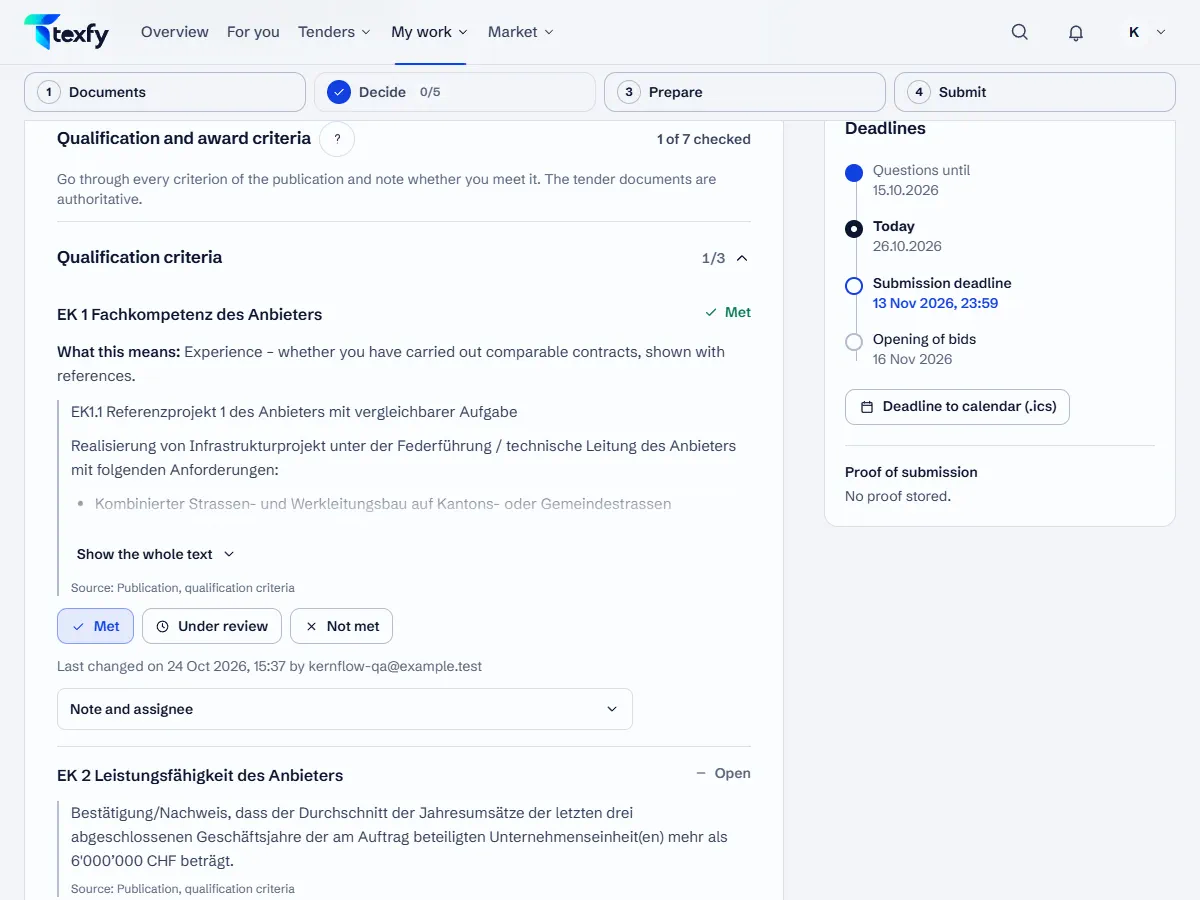
The page of every bid lists the eligibility and award criteria of the publication. Your team records whether you meet them.
 Open the picture at full size (new tab)
How it works
- 1
Open the criteria
Open a bid and go to the step “Review and decide”. Under “Qualification and award criteria” are the criteria of the publication, split into eligibility and award.
- 2
Record the status
Choose Met, Under review or Not met for each criterion. A note and an assignee record what is still missing, such as a reference or a proof.
- 3
See the progress
The list and the board of bids show how many criteria have been checked. Each criterion shows who last changed it and when.
- 4
Changed criteria
If simap changes a criterion after your check, it is marked “Criterion changed, please check again” with the earlier status. Check it again then.
- 5
Questions to the contracting authority
You collect unclear points in the bid under “Questions to the contracting authority”, one question per paragraph. The deadline for questions and the way to ask them are shown there, on simap.ch usually the tender's question forum. Only your list is saved, nothing is sent; “Copy list” copies it.
- 6
Questions on the documents
With Pro, TEXFY reads twelve fixed questions from the documents uploaded to the bid under “Requirements from the documents”: eligibility criteria and proofs, award criteria, deadlines, form of submission, site visit, variants, references, language, validity period, minimums and attachments. One reading counts as one question of the month, and for every answer you record, as for the criteria, whether you meet it. Under “Questions on the documents” you ask your own questions; per person in the team and month the company has 100 questions, which the team shares. The AI only answers when it finds the passage word for word, and shows the file and page; otherwise it says “Not found in the documents”. Scanned PDFs without a text layer are read by text recognition, up to 120 pages per file and 500 pages per person and month; quotes from them are marked “read from scan”, because single characters can be wrong. The documents prevail.
Good to know
- Check the eligibility criteria first: a bidder who fails one can be excluded before the bids are scored.
- The tender documents prevail. The publication does not always name all criteria.
Questions about this
Who can check criteria?
Everyone in the team allowed to edit bids: the owner, admins and members.