Export to Excel or CSV
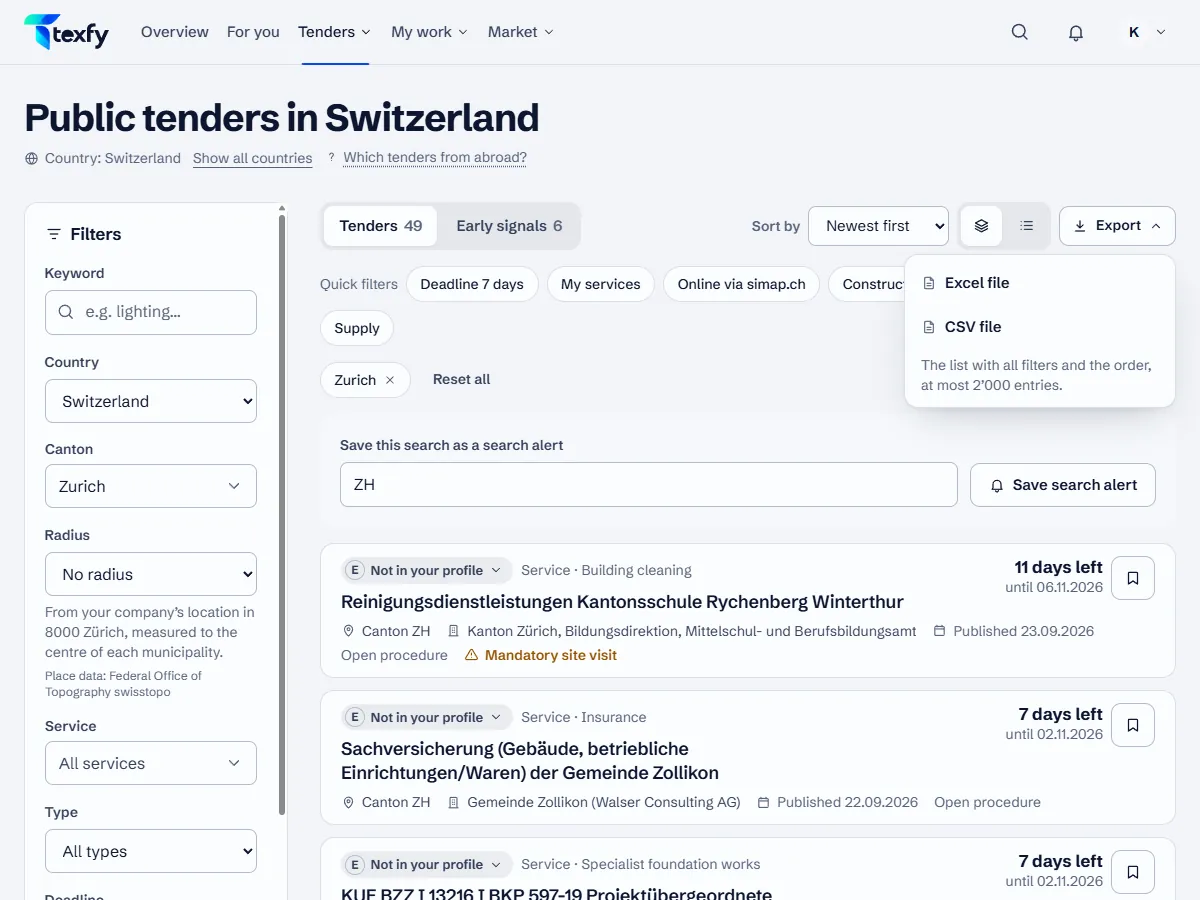
Signed in, you download lists as an Excel file (.xlsx) or a CSV file, with the filters and sorting you see.
 Open the picture at full size (new tab)
How it works
- 1
Tender list
Filter the list under Tenders and choose “Export”, then Excel or CSV. The file contains the list with all filters and the sorting, at most 2’000 entries, with relevance grade, deadline and source.
- 2
Saved tenders
Under Saved you export all saved tenders with relevance grade, deadline, state and bid.
- 3
Bids
Under Bids you export all bids with status, deadlines and progress: checkpoints, criteria, tasks, assignee and your own bid amount.
- 4
Awards and contracts
On the canton and service pages, the pages of contracting authorities and in the monthly reports you download the awards with “Export”, under contracts expiring soon the list with the page's filters. A file holds at most 2’000 awards or contracts, one row per winner; if it was cut, the last row says so.
- 5
A single tender
On a tender page “Export” opens the print view: “Print or save as PDF” gives an A4 page; signed in, “Download as text (.md)” downloads the same details as a Markdown file.
- 6
Open
The CSV file is prepared for Excel (UTF-8, semicolon). The Excel file has a frozen header row with filters.
Good to know
- The “Source” column names the publication. The official publication prevails.
- You download your account and company data under Profile › Account & security.
Questions about this
Is there a limit?
Yes: at most 2’000 entries per export of the tender list, 2’000 awards or contracts per export of market data and 30 exports per person and hour.