Team and roles
Everyone in the team sees the same saved tenders, search alerts and bids. A team needs Pro (CHF 49.90 per person per month); with Free only the owner works.
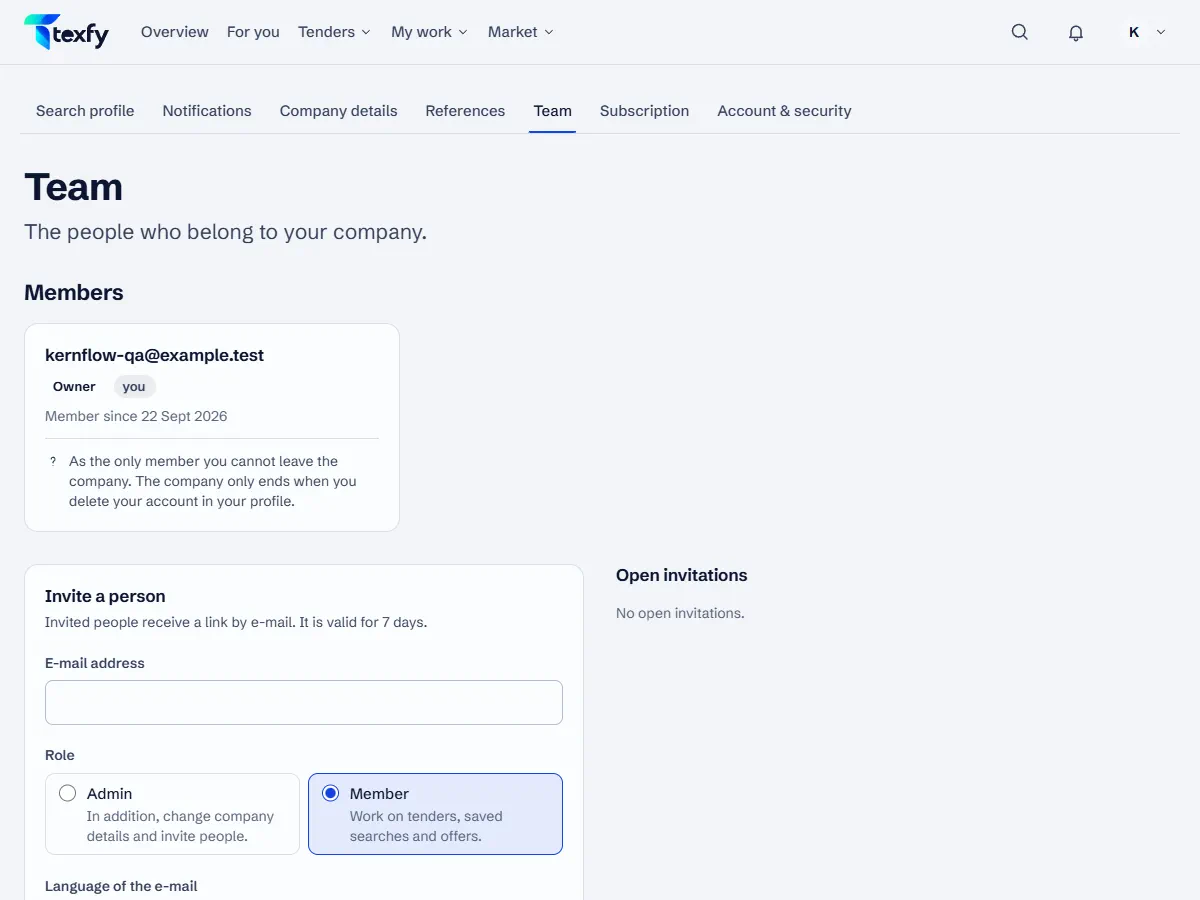 Open the picture at full size (new tab)
How it works
- 1
Invite a person
Under Profile › Team choose “Invite your team”, enter the e-mail address, the role and the language of the e-mail, confirm what the person costs and send the invitation. The link is valid for 7 days. Only the owner can invite, with Pro or during the trial.
- 2
Accept the invitation
The invited person signs in with exactly this address and accepts the invitation. A person can only belong to one company.
- 3
The roles
Members work on tenders, search alerts and bids. Admins can also change the company details and the search profile, assign roles and remove people. The owner also invites people and manages the subscription and payment.
- 4
Change roles and remove
The owner and admins change the role of other members or remove them. A removed person loses access at once; bids, notes and activity stay in the company. With a paid subscription, it then goes down by one person.
- 5
Transfer the owner role
The owner can transfer the role to another member and becomes an admin. Only the new owner can transfer it back.
- 6
Leave the company
Admins and members leave the company on their own card in the team. The account remains; coming back needs a new invitation.
Good to know
- You can resend or revoke an invitation; the previous link then no longer works.
Questions about this
Does each person cost extra?
Yes. Pro costs CHF 49.90 per person per month. All members count, the owner included, once they have accepted the invitation; open invitations do not count. When someone joins or leaves, the subscription adjusts pro rata. With Free one person works, the owner; without Pro the other members have no access but stay stored.