Search alerts, notifications and digest
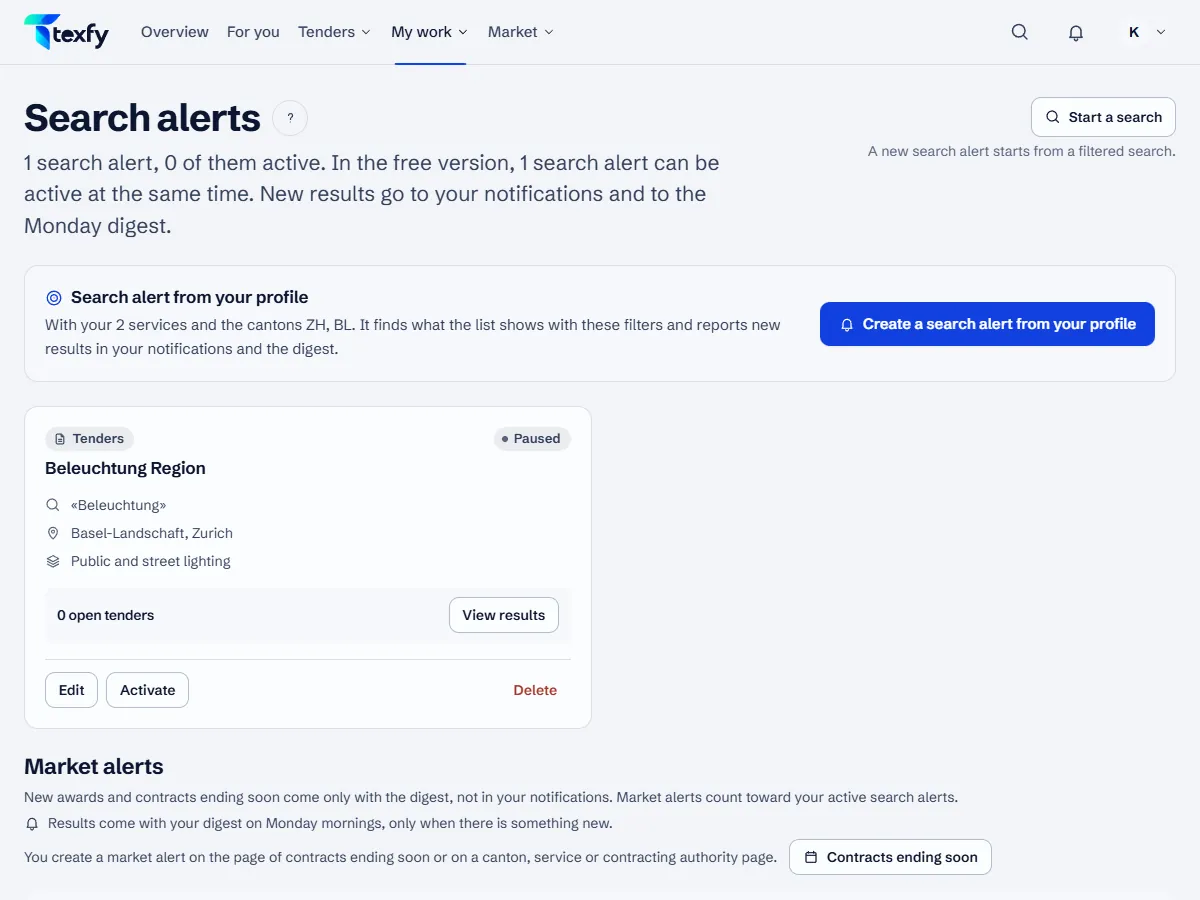
A search alert remembers a filtered search and reports new results, on top of the results from your search profile.
 Open the picture at full size (new tab)
How it works
- 1
Filter the search
Open All tenders and filter by keyword, canton, service, type, deadline or submission route. Under “More filters” you narrow down by classification codes (CPV, BKP, NPK), procedure and “First published”, and “Without these words” leaves out whatever contains one of them. A search alert finds exactly what the list shows with these filters.
- 2
Radius and map
Signed in, you choose under “Radius” up to 5, 10, 20, 30, 50 or 100 km around your company's location, measured to the centre of each municipality; this needs your company's address in Switzerland under Profile › Company details. “On the map” shows in which municipalities the tenders of the list are carried out. Instead of your company's location you can also measure from a postcode. A search alert keeps the radius and then only reports tenders with the postcode of the place of performance in Switzerland; it does not keep the municipality chosen on the map.
- 3
Save as a search alert
Choose “Save this search as a search alert”, give it a name and save. It needs at least one filter that narrows the list down: leaving out words or “First published” alone make no search alert. Under Search alerts you can also create one straight from your search profile.
- 4
New results
New results appear under Notifications, each tender only once and with the reason. The card of the search alert shows how many are open and how many came in during the last 7 days.
- 5
E-mail digest
The digest sums up new results by e-mail, only when there is something new. When something new is a good fit, it comes the next morning and brings, with Pro, all new matches, with Free, the good fits. With Pro it also comes when a search alert finds something. On Monday it brings everything collected, with Free also the other finds of the search alerts. On Monday it ends with “Your market this week”, with figures for your services and cantons, so on Monday it comes even in a week without new results, unless nobody from the company has signed in or visited the platform since the first of the last four Monday e-mails with only this overview; a click in an e-mail without signing in does not count. If nobody from the company has signed in or visited the platform for 90 days, a single question replaces the next digest: shall it keep coming? After that it pauses for everyone until someone signs in, visits the platform or chooses “Yes, keep sending” in that e-mail. The owner and admins switch the company digest on under Profile › Notifications; it goes to the owner. Every other member switches on “Personal digest” there for their own address, in their language.
- 6
Pause, edit, delete
On the card of a search alert you pause it, edit its name and filters or delete it. Active at the same time: with Free 3 search alerts, with Pro up to 20.
- 7
Market alerts
You create alerts for new awards and contracts expiring soon on the pages under Market. Under Search alerts they are listed in the section “Market alerts”, where you pause or delete them; they count towards your active search alerts. They report results only in the digest, not under Notifications. A market alert with a canton reports what the page of that canton shows, so no awards or contracts for all of Switzerland.
- 8
Changes to your tenders
If simap publishes a correction, a new deadline, an award, an abandonment or a revocation for a saved tender or a bid, a notification appears with the next update, by e-mail too if you wish.
- 9
Building application alerts
You set up alerts for building applications on the Building applications page. They are listed under Search alerts in a section of their own and count towards your active search alerts.
Good to know
- Several narrow search alerts often match better than one broad one.
- With Pro, matching early signals also arrive as notifications and in the digest.
- A search alert with a canton also reports tenders for all of Switzerland and those without a fixed place, as they can concern any canton.
Questions about this
How many search alerts can I create?
Active with Free: 3 search alerts, with Pro up to 20 at the same time. Paused ones do not count.
Why did no digest arrive?
The digest only comes when there is something new. Check under Profile › Notifications that it is switched on, and under Notifications when the last check ran and when the last digest was sent.