“For you” and the relevance grade
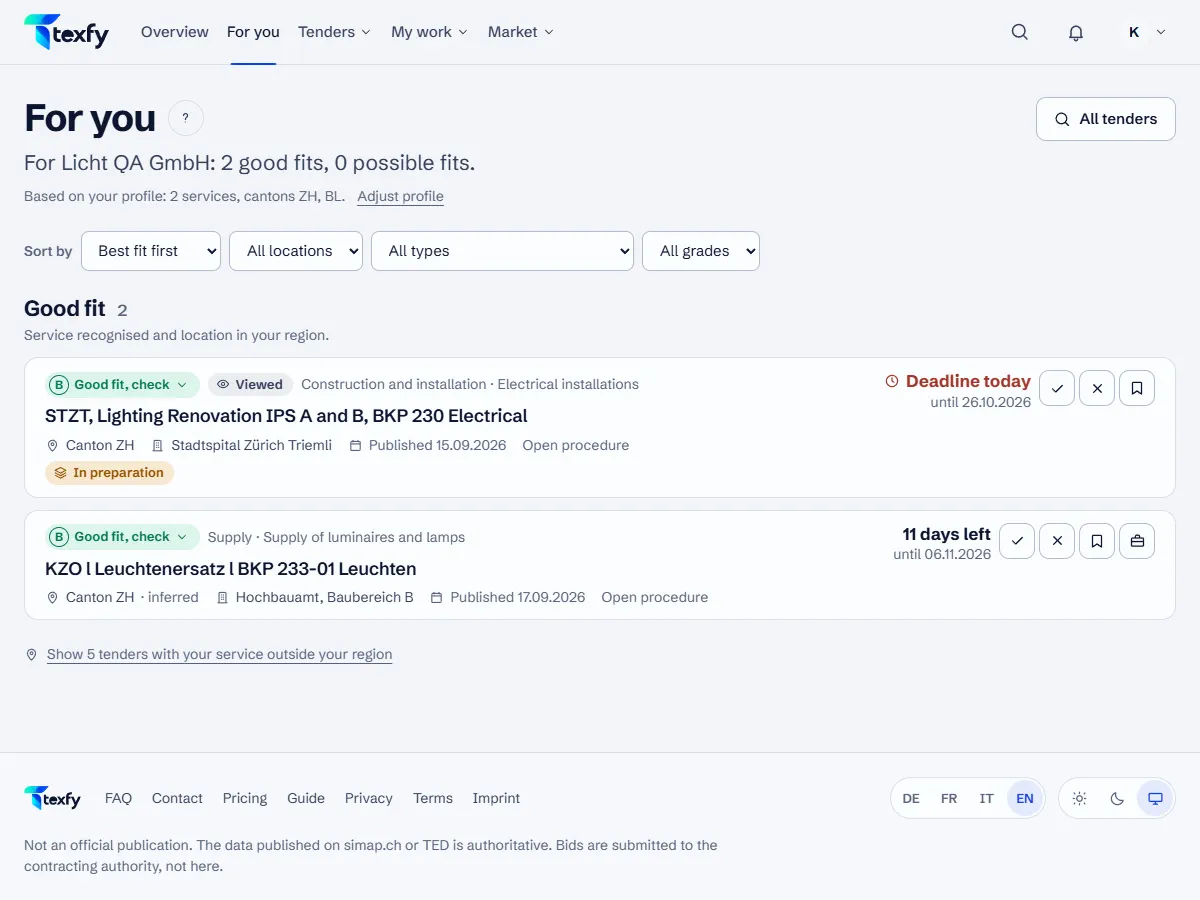
“For you” shows the open tenders that match your search profile, each with a grade from A to E and the reasons.
 Open the picture at full size (new tab)
How it works
- 1
Read the grade
A and B are a good fit; with B one point needs a look, such as a place taken from the text or abroad, a different type of contract or a deadline within a week. C and D are a possible fit: the service is in the title or a code (C) or only in the description (D). E means: no service from your profile, or outside your region. A click on the grade shows the four points service, place, type and deadline.
- 2
Sort and filter
Sort by “Best fit first”, “Deadline first” or “Newest first” and filter by place, type and grade, for example A and B only.
- 3
Hide what does not fit
With the cross on a card you mark a tender as not relevant, and it disappears from “For you”. In a team you choose “Hide for me only”, so your team still sees it, or “Hide for the whole team”. Under “Hidden” you filter by “All”, “For me only” or “For the team” and bring a tender back with “Show again”. With “Relevant” you mark a good match.
- 4
Outside your region
On request you show tenders with a service from your profile in a place outside your cantons. They do not go into the digest.
- 5
Early signals
Below the tenders are the early signals that match your profile or a search alert: prior notices, market surveys, design contests and study contracts.
- 6
From a match to a bid
With “Save” you keep a tender, with “Prepare bid” you add it to your bids. The tender page shows deadlines, criteria and where to submit.
Good to know
- The grade sorts, it does not rate the contract. The tender documents prevail.
- A tender from abroad gets a B at most: whether companies from Switzerland may bid is up to the tender.
Questions about this
Is there a percentage?
No. The grade rests on four points you see with a click on it, not on a probability.
Why does a “Good fit” tender only get a B?
Because one point needs a look: a place taken from the text rather than the details of the publication, a place abroad, a different type of contract than in your profile or a deadline within a week.